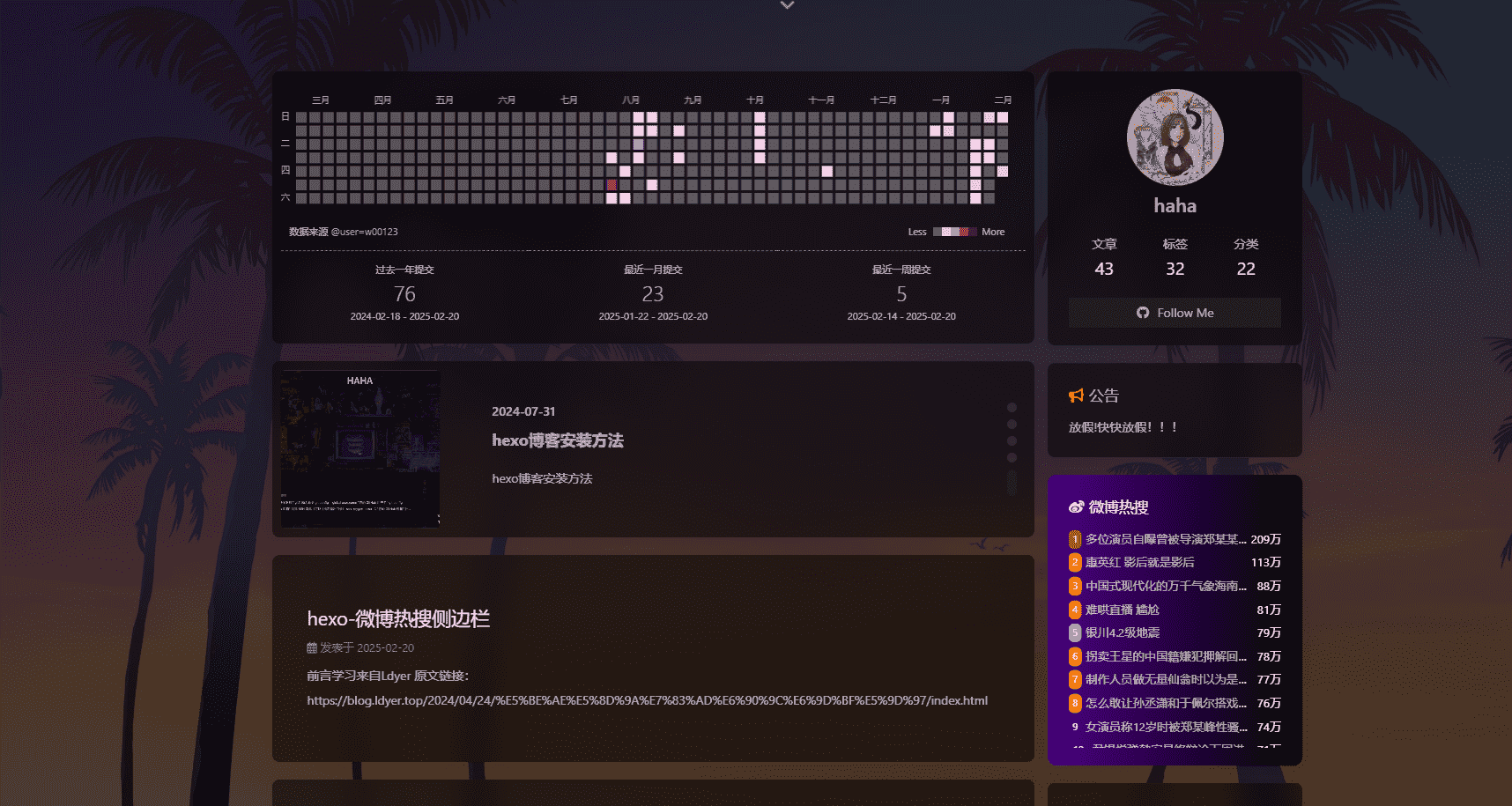
前言
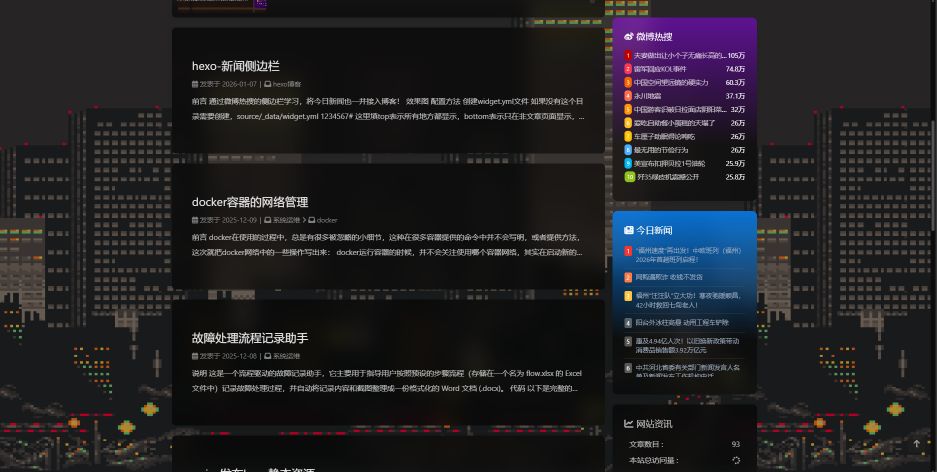
通过微博热搜的侧边栏学习,将今日新闻也一并接入博客!
效果图
配置方法
如果没有这个目录需要创建,source/_data/widget.yml
1 2 3 4 5 6 7 8 9 10 11 12 13 bottom: - class_name: id_name: weibo name: 微博热搜 icon: fa-brands fa-weibo html: <link rel="stylesheet" href="/css/weibo.css"><div id="weiboContent"></div><script src="/js/weibo.js"></script> - class_name: id_name: news name: 今日新闻 icon: fa-solid fa-newspaper html: <link rel="stylesheet" href="/css/news.css"><div id="newsContent"></div><script src="/js/news.js"></script>
创建news.css
创建themes/butterfly/source/css/news.css
1 2 3 4 5 6 7 8 9 10 11 12 13 14 15 16 17 18 19 20 21 22 23 24 25 26 27 28 29 30 31 32 33 34 35 36 37 38 39 40 41 42 43 44 45 46 47 48 49 50 51 52 53 54 55 56 57 58 59 60 61 62 63 64 65 66 67 68 69 70 71 72 73 74 75 76 77 78 79 80 81 82 83 84 85 86 87 88 89 90 91 92 93 94 95 96 97 98 99 100 101 102 103 104 105 106 107 108 109 110 111 112 113 114 115 116 117 118 119 120 121 122 123 124 #news .card-widget { background : linear-gradient ( to bottom, rgba (0 , 132 , 255 , 0.788 ) 0% , rgba (0 ,0 ,0 ,0.5 ) 70% ) !important ; border-radius : 10px ; color : white; border-width : 10px ; padding-bottom : 35px ; } #newsContent { width : 100% ; height : 270px ; font-size : 90% ; overflow-y : auto; -ms-overflow -style: none; scrollbar-width : none } #newsContent ::-webkit-scrollbar { width : 4px ; } #newsContent ::-webkit-scrollbar-track { background : rgba (0 , 20 , 40 , 0.3 ); border-radius : 2px ; } #newsContent ::-webkit-scrollbar-thumb { background : rgba (255 , 255 , 255 , 0.3 ); border-radius : 2px ; } .empty-tip { text-align : center; padding : 30px 0 ; color : rgba (255 , 255 , 255 , 0.7 ); font-size : 14px ; } .news-list { list-style : none; padding : 0 ; margin : 0 ; } .news-item { display : flex; align-items : flex-start; padding : 8px 0 ; border-bottom : 1px solid rgba (255 , 255 , 255 , 0.1 ); gap : 8px ; } .news-rank { display : inline-flex; align-items : center; justify-content : center; width : 15px ; height : 20px ; border-radius : 3px ; background : rgba (255 , 255 , 255 , 0.3 ); color : white; font-size : 12px ; flex-shrink : 0 ; } .news-rank-top1 { background : #f43530 ; }.news-rank-top2 { background : #ff7a45 ; }.news-rank-top3 { background : #ffc53d ; }.news-title { flex : 1 ; font-size : 13px ; color : rgba (255 , 255 , 255 , 0.9 ); text-decoration : none; line-height : 1.4 ; word-break : break-all; } .news-title :hover { color : #fff ; text-decoration : underline; } @media (max-width : 768px ) { #newsContent { max-height : 400px ; } .news-list-wrapper { padding : 10px ; } .news-item { padding : 6px 0 ; } .news-title { font-size : 12px ; } } #newsContent :empty ::after { content : "暂无新闻数据" ; display : block; text-align : center; padding : 20px 0 ; color : rgba (255 , 255 , 255 , 0.7 ); font-size : 14px ; }
创建news.js文件
创建themes/butterfly/source/js/news.js
1 2 3 4 5 6 7 8 9 10 11 12 13 14 15 16 17 18 19 20 21 22 23 24 25 26 27 28 29 30 31 32 33 34 35 36 37 38 39 40 41 42 43 44 45 46 47 48 49 50 51 52 53 54 55 56 57 58 59 60 61 62 63 64 65 66 67 68 69 70 71 72 73 74 75 76 77 (function ( const API_URL = 'https://tools.mgtv100.com/external/v1/toutiao/index' ; const CACHE_DURATION = 10 * 60 * 1000 ; const CACHE_KEY = 'news_list_cache' ; function news ( let html = '<div id="newsContent">' ; let data = JSON .parse (localStorage .getItem (CACHE_KEY )); let nowTime = Date .now (); let ls; if (data == null || nowTime - data.timestamp > CACHE_DURATION ) { getData (); return ; } else { ls = data.data ; } if (!ls || ls.length === 0 ) { html += '<div class="empty-tip">暂无新闻数据~</div>' ; } else { for (let i = 0 ; i < ls.length ; i++) { let item = ls[i]; let rankClass = i < 3 ? ` news-rank-top${i+1 } ` : '' ; html += '<li class="news-item">' ; html += `<div class="news-rank${rankClass} ">${i+1 } </div>` ; html += `<span class="news-title"><a title="${item.title || '无标题' } " href="${item.url || '#' } " target="_blank" rel="external nofollow noreferrer">${item.title || '无标题' } </a></span>` ; html += '</li>' ; } html += '</div>' ; } document .getElementById ('newsContent' ).innerHTML = html; } function getData ( fetch (API_URL , { method : 'GET' , headers : { 'Content-Type' : 'application/json' } }) .then (response => if (!response.ok ) throw new Error (`状态码: ${response.status} ` ); return response.json (); }) .then (data => const hotList = data?.data ?.result ?.data || []; const cacheData = { timestamp : Date .now (), data : hotList }; localStorage .setItem (CACHE_KEY , JSON .stringify (cacheData)); news (); }) .catch (error => console .error ('获取新闻数据失败:' , error); document .getElementById ('newsContent' ).innerHTML = '<div class="empty-tip">暂无新闻数据~</div>' ; }); } try { if (document .getElementById ('news' ).clientWidth ) news (); } catch (error) { news (); } })();
加入卡片
微博加过就不需要了
1
2
3
4
5
aside: .......... card_webinfo: enable: true post_count: true
调整侧边栏顺序
调整sort_order大小即可,数字越大越前,要把公告后的卡片都加上数字(有的资料说是越小越前,但是我测试不是,反正能用就行)